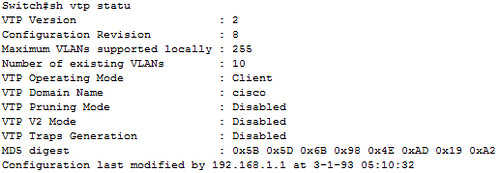
vtp status
這一篇在草稿裡面躺了半年...
關於VTP,有些被我想複雜了,有些卻被我想簡單了。
參考文件:Understanding VLAN Trunk Protocol (VTP)
1.
這個被我想複雜了
VTP = Layer2 protocol,  why IP here ?
以為這之中有甚麼驚人的秘密,的確!根本就沒有秘密...
這個IP是"Updater Identity",識別而已,並不參與VTP的運作。
Code = 0x02 = advertisement 
2.
這被我想簡單了
我以為VTP server就一直把advertisement packets丟出去,client就一直撿起來compare這樣。
但事實上client是會發出advertisement request的。
advertisement request packet format :
Code = 0x03 = advertisement request
而且還會針對沒被update的部分發出request,有聰明。
3.
這點我到現在還不明白:為什麼明明是layer2的 "frame",cisco要把它叫做 "packet"?
知道的大德請不吝賜教~~~~
-------------------------------------------------------------------------
同場加映

misgary 發表在 痞客邦 留言(0) 人氣()

話說1991年OSPF上路之後,CISCO就用『10^8/bandwidth』來計算鏈路的cost (CISCO好像比較喜歡稱作metric)。
10^8其實就是100Mbps,當時會用100M做分子不是巧合,而是在1991年時100M仍然是個神話。後來因為資源共享的氣候形成,導致對網路頻寬的需求暴增,802.3u(FastEthernet)很快地在1995年通過RFC。其後短短三年時間,OC-3(155M)、802.3z(GigabitEthernet)各種高速網路相繼問世。
問題就來了,當大於100M的鏈路套進『10^8/bandwidth』來計算的結果就是無條件進位成1,這將使得cost值形同虛設。所以CISCO早在1994年發布IOS 11.2的時候為metric的計算增加了一個"auto-cost reference-bandwidth"的指令,藉以彌補『10^8/bandwidth』公式的不足。這個指令可以將分子(也就是原本是10^8)的value指定在1到4294967之間,請注意,單位是"megabits per second ",而default為100。這樣,OSPF就又可以用上好一陣子了。

misgary 發表在 痞客邦 留言(0) 人氣()

  • Apr 17 Tue 2012 23:42
  • 150m

150m
上篇介紹了牛B的山寨線,今天讓大家知道好線的極致性能!
 這條線足足跑了150米,其中大約30米是12年前佈的AMP Cate 5,其他的部分是三年前拉的3M Cate5e,中間繼接用3M的keystone。這樣的組合,仍然跑出了1G的成績!
接上設備show了一下ethernet-controller,no runts,no giants。
快!快叫我超級水電工~~
同場加映

misgary 發表在 痞客邦 留言(0) 人氣()

IMG-20120405-00185
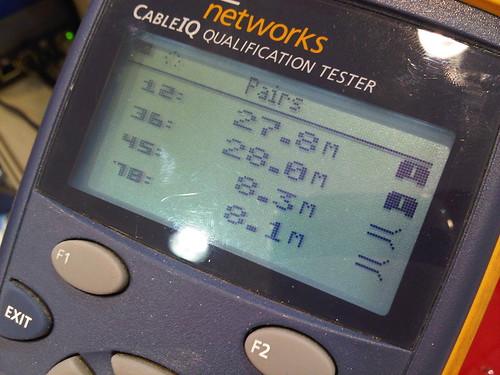
這是我目前遇到過最牛B的山寨網路線了,留文一篇以紀念。
通常跑10/100Mb只用到1&2、3&6這兩對線,所以很多不肖廠商就從4&5、7&8去偷料。山寨線大多有這樣的特徵,這條當然也不例外。

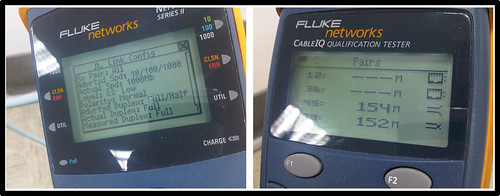
不過最牛B的是4&5、7&8竟然還可以時通時不通,而且每次測試出來的長度都不一樣耶。
很多佈線廠商只是做做家庭水電,不了解跑網路跟跑電話是不一樣的,他們通常會丟一句那是你電腦的問題,這時候如果沒有纜線測試儀幫你做驗證就等著挫屎。
大滿貫測試下來,連10BASE都不及格。
雖然測試結果是完全不及格,但仍然可以辨識出switch的訊號。
主要是因為測試儀是用嚴苛的標準去測試,而網路設備本身具備一些容錯能力,所以這麼爛的線有時還是堪用。
不過千萬不要拿到商業環境來用,甚麼時候會掛,不知道。就跟甚麼時候老闆要請你打包走人,不知道,是一樣的道理。
同場加映我們家高手的作品一張

misgary 發表在 痞客邦 留言(0) 人氣()

DSC_6667
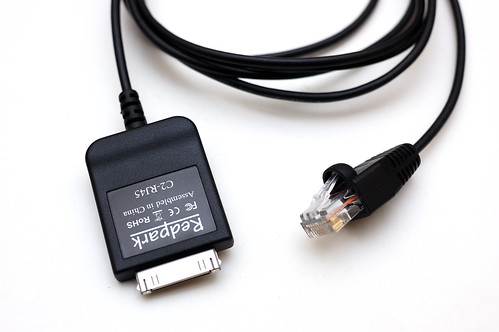
用這條線,一邊接iPad,另一邊接CISCO的console port。開機快,續航力也比notebook強,而且適用所有iDevice!

 插上去之後iPad會自動抓到。

misgary 發表在 痞客邦 留言(2) 人氣()

Picture 8
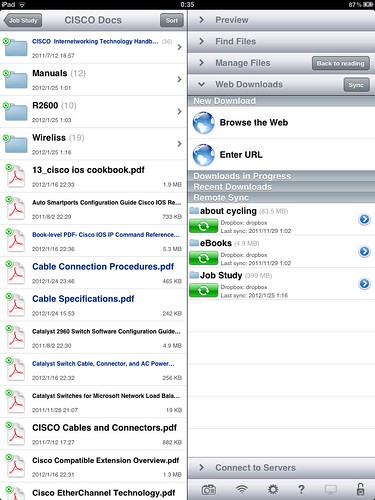
Apple號稱iPad是「電子閱讀器」,果然,官方那套iBooks讓人閱讀到生氣。
 
所以iPad到手沒幾天(感謝老妹),我就在Apple Store買了Good Reader。

misgary 發表在 痞客邦 留言(0) 人氣()

1.Press Break(CTRL+Break) on the terminal keyboard within 60 seconds of power up in order to put the router into ROMmon.


2.hostname> confreg 0x2142This step bypasses the startup configuration where the passwords are stored.


3.hostname> reset
The router reboots, but ignores the saved configuration.


4.Type no after each setup question, or press Ctrl-C in order to skip the initial setup procedure.


5.hostname> enable 


6.hostname# configure memory or copy startup-config running-config 
in order to copy the NVRAM into memory.
 
Warning: Do not type copy running-config startup-config or write. These commands erase your startup configuration.
 
 7.Type show running-config.

The show running-config command shows the configuration of the router. In this configuration, the shutdown command appears under all interfaces, which indicates all interfaces are currently shut down. In addition, the passwords (enable password, enable secret, vty, console passwords) are in either an encrypted or unencrypted format. You can reuse unencrypted passwords. You must change encrypted passwords to a new password.


8.hostname(config)# configure terminal


9.hostname(config)# enable secret 00000


10.Issue the no shutdown command on every interface that you use.


11.hostname(config)# config-register 0x2102


12.hostname# write memory or copy running-config startup-config
 

Configuration Register Values
The factory-default setting for the configuration register is 0x2102. This indicates that the router should attempt to load a Cisco software image from Flash memory and load the startup configuration with a console speed of 9600 baud.


Configuration Register Setting


Router Behavior


0x102


  •  

    • Ignores break


    • 9600 console baud


0x1202


  •  

    • 1200 baud rate


0x2101


  •  

    • Boots into bootstrap

    • Ignores break


    • Boots into ROM if initial boot fails


    • 9600 console baud rate


0x2102


  •  

    • Ignores break


    • Boots into ROM if initial boot fails


    • 9600 console baud rate default value for most platforms


0x2120


  •  

    • Boots into ROMmon


    • 19200 console speed


0x2122


  •  

    • Ignores break


    • Boots into ROM if initial boot fails


    • 19200 console baud rate


0x2124


  •  

    • NetBoot


    • Ignores break


    • Boots into ROM if initial boot fails

    • 19200 console speed


0x2142


  •  

    • Ignores break


    • Boots into ROM if initial boot fails


    • 9600 console baud rate


    • Ignores the contents of Non-Volatile RAM (NVRAM) (ignores configuration)


0x2902


  •  

    • Ignores break


    • Boots into ROM if initial boot fails

    • 4800 console baud rate


0x2922


  •  

    • Ignores break

    • Boots into ROM if initial boot fails

    • 38400 console baud rate


0x3122


  •  

    • Ignores break


    • Boots into ROM if initial boot fails


    • 57600 console baud rate


0x3902


  •  

    • Ignores break


    • Boots into ROM if initial boot fails


    • 2400 console baud rate


0x3922


  •  

    • Ignores break


    • Boots into ROM if initial boot fails


    • 115200 console baud rate


misgary 發表在 痞客邦 留言(0) 人氣()


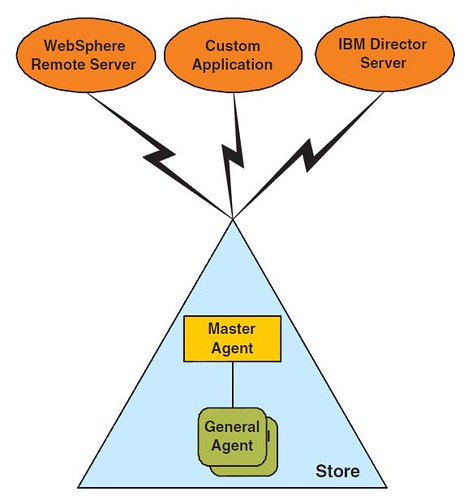
RMA infrastructure
RMA General Agent
Forms the client portion of the RMA infrastructure, running on each POS client device.

misgary 發表在 痞客邦 留言(0) 人氣()

PAgP cannot be enabled on cross−stack EtherChannels while LACP is supported on cross−stack EtherChannels from Cisco IOS Software Release 12.2(25)SEC and later.
Interfaces with the on mode configuration do not exchange PAgP or LACP packets.

These EtherChannel modes are supported on cross−stack EtherChannel:
active Places an interface into an active negotiation state, in which the interface starts negotiations with other interfaces by sending LACP packets.
passive Places an interface into a passive negotiation state, in which the interface responds to LACP packets that the interface receives, but does not start LACP packet negotiation. This setting minimizes the transmission of LACP packets.
on Forces the interface into an EtherChannel without PAgP or LACP. With the on mode, a usable
EtherChannel exists only when an interface group in the on mode has a connection to another
interface group in the on mode.
on mode command
3750switchstackA(config)#interface range gigabitethernet 1/0/4 − 5
3750switchstackA(config−if−range)#channel−group 1 mode on
3750switchstackA(config−if−range)#switchport trunk encapsulation dot1q
3750switchstackA(config−if−range)#switchport mode trunk
跑了Pagp會警告
With PAgP enabled, all ports in the Channel should belong to the same switch
Command rejected (Port−channel1, Gi2/0/3): Invalid etherchnl mode
LACP mode (active-active)
3750switchstackA(config)#interface range gigabitethernet 1/0/4 − 5
3750switchstackA(config−if−range)#channel−group 1 mode active
3750switchstackA(config−if−range)#switchport trunk encapsulation dot1q
3750switchstackA(config−if−range)#switchport mode trunk
驗證
3750switchstackA#show interfaces port−channel 1
3750switchstackA#show etherchannel summary
注意spanning tree
misgary 發表在 痞客邦 留言(0) 人氣()

1
Blog Stats
⚠️

成人內容提醒

本部落格內容僅限年滿十八歲者瀏覽。
若您未滿十八歲,請立即離開。

已滿十八歲者,亦請勿將內容提供給未成年人士。